Can a password manager deliver both ultra-secure protection and simplicity you’ll genuinely enjoy using? That’s the fundamental question we aimed to answer in this comprehensive Proton Pass review. Created by the same privacy-first team behind Proton Mail, Proton Pass isn’t merely another tool in a saturated market — it’s an open-source manager prioritizing security and transparency above all else.
However, here’s the interesting part: While it guarantees airtight protection, how does it actually perform under real-world testing? We conducted thorough evaluations, stored our credentials, and even stress-tested its autofill functionality. Jump straight to Proton Pass in action!
Proton Pass Quick Overview
| Specification | Details |
|---|---|
| Website | Proton.me/pass |
| Platforms | Windows, macOS, Linux, Android, iOS, web app |
| Browser extensions | Chrome, Firefox, Brave, Safari, and Edge |
| Free version | Yes |
| Encryption | AES-GCM 256-bit |
| Support | Knowledge base, email, social media |
| Price | From $1.99/month |
| Best Deal | 60% Off Coupon > |
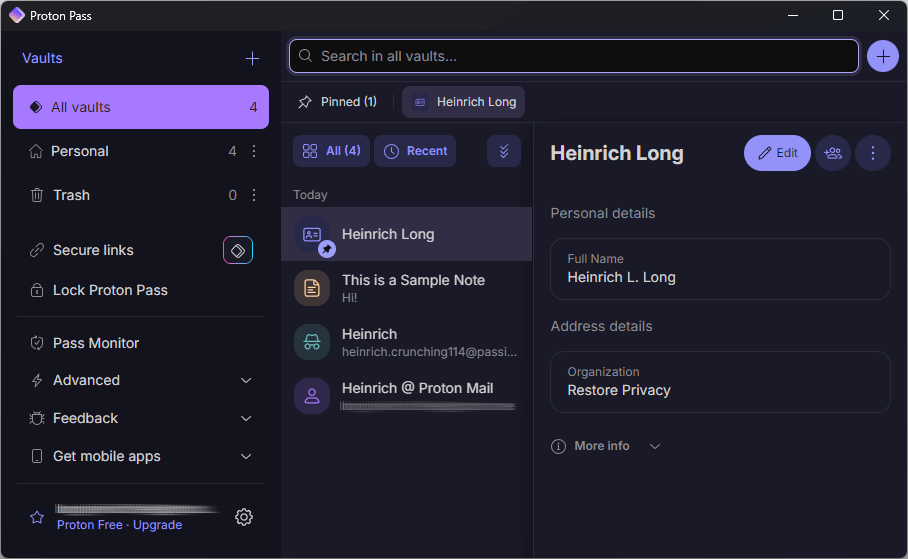
Throughout this review, we’ll explore its core capabilities, security infrastructure, and integration within the Proton ecosystem. We’ll also examine the advanced features available in paid versions of Proton Pass to help you determine which option suits your needs.
Key Findings from Testing Proton Pass
- Proton Pass is an open-source password manager emphasizing security and privacy through end-to-end encryption and a zero-knowledge architecture.
- The service integrates seamlessly with other Proton tools and operates across multiple platforms, making it accessible to diverse user groups.
- Proton Pass provides a useful free version and various paid tiers featuring advanced functionality, prioritizing user data protection without advertisements or data collection.
- Proton Pass pricing remains competitive, delivering affordability and value through its comprehensive features. The Proton Pass Plus plan offers extensive benefits at reasonable pricing compared to other password managers.
- To secure the best deal on Proton Pass, utilize this 60% off coupon.
Understanding Proton Pass: What Makes It Different
Proton Pass is a sophisticated password manager developed by the same team behind the renowned secure email service, Proton Mail. Designed to help you manage passwords securely and efficiently, Proton Pass delivers a comprehensive suite of features protecting your online credentials.

With end-to-end encryption, dark web monitoring, and seamless password sharing, Proton Pass ensures your passwords remain safe from unauthorized access. This impressive tool not only stores your passwords but also enhances your overall online security, making it an essential addition to your digital life.
Advantages and Limitations of Proton Pass
This password manager brings substantial offerings to the table, with both significant benefits and minor drawbacks:
Advantages
- Strong privacy protection and end-to-end encryption
- Compatible with all devices and browsers
- Free version offering unlimited passwords
- Customizable password and passphrase generator
- Multiple vaults featuring secure sharing
- Integration with Proton ecosystem applications
- Passkey support enabling passwordless login
- Identity management for personal information
- Continuous updates and new features
- Open-source and independently auditable
Limitations
- No live chat or AI support available
- Import/export can require manual steps
- Newer than long-established competitors
Now that we’ve examined the advantages and drawbacks, it’s time to explore what Proton Pass actually delivers.
Core Features Inside Proton Pass Explained
- End-to-end encryption and zero-knowledge architecture
- Two-factor authentication and dark web monitoring
- User-friendly interface across multiple platforms (iOS, Android, Windows, macOS, Linux)
- Seamless integration with other Proton services (Mail, VPN, Drive)
- Free plan featuring capabilities exceeding many paid competitors
- No advertisements or data collection
Proton Pass stands out through its cutting-edge security measures, including end-to-end encryption and a zero-knowledge model, ensuring only users can access their data. Based in Switzerland, it benefits from stringent privacy laws, further enhancing user data protection. The open-source nature of Proton Pass allows for community review, building trust and transparency.
Creating a strong Proton Pass account password during setup is crucial as it plays a significant role in your data encryption. Beyond simple password storage, Proton Pass functions as an identity manager, safeguarding your entire online presence.

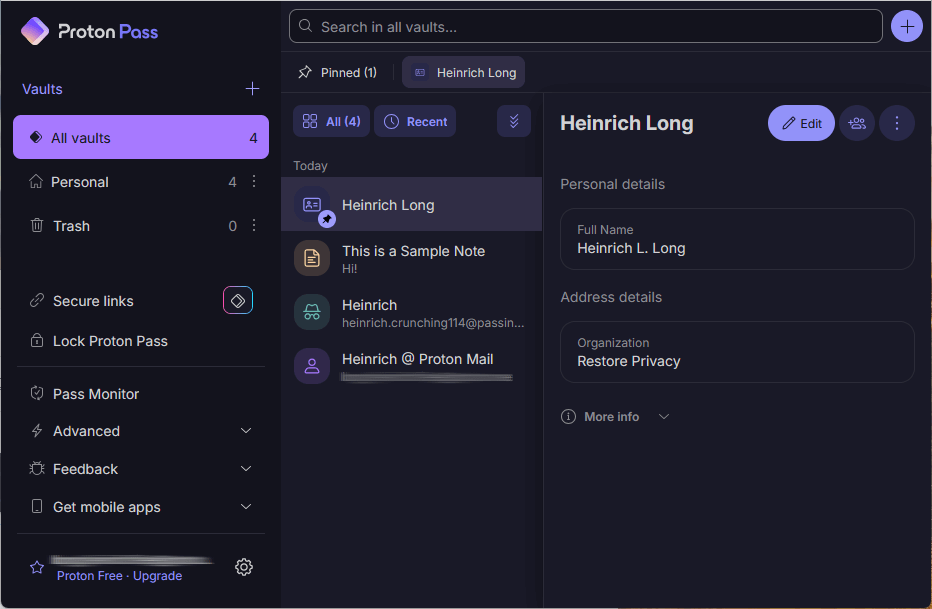
It offers features including password generation, email aliases, and autofill capabilities, making it a comprehensive solution for online security. With its innovative design free from legacy constraints, Proton Pass provides a user-friendly experience while maintaining top-tier security standards.
As part of the broader Proton ecosystem, Proton Pass integrates seamlessly with other Proton services, forming an integrated platform for digital privacy and security. Whether you choose the feature-rich free plan or premium options, Proton Pass offers a cost-effective and secure solution for managing online identities in an increasingly vulnerable digital landscape.
Proton Pass Safety and Security Infrastructure
Safety and security form the foundation of Proton Pass. It employs state-of-the-art encryption to protect user data. Proton Pass also offers two-factor authentication, securely storing and auto-filling authentication codes using time-based one-time passwords (TOTP). This added security layer makes it significantly harder for unauthorized users to gain account access.

The open-source nature of Proton Pass allows for transparency in its security architecture, enabling the community to review and verify its security protocols. The combination of powerful security features and a transparent, open-source approach makes Proton Pass a safe platform for managing passwords and sensitive information.
Essential Features of Proton Pass
Proton Pass comes equipped with a range of features designed to enhance both security and usability. The service also emphasizes protecting personal identity information, particularly email addresses. Proton Pass uses email aliases to protect your email address from exposure, promoting anonymity and safeguarding against data breaches.
The following subsections explore the basic and advanced features distinguishing Proton Pass.
Basic Features That Matter
Proton Pass nails the essentials of a modern password manager, providing all the core tools you’d expect — and then some. Here’s what you receive right from the start:
- Unlimited storage — Maintain as many passwords and secure notes as you need, even on the free plan. No frustrating limits or paywalls.
- Sync everywhere — Whether you’re on your phone, desktop, or using a browser extension, your vault stays in perfect sync across unlimited devices.
- Autofill and autosave — Proton Pass automatically fills login forms for you and saves new credentials as you create them. Less typing, more productivity.
- Password generator — Need a strong new password? The built-in generator creates unique, complex passwords in seconds.
- Passkey support — Go passwordless on supported sites with passkeys, a safer, phishing-proof authentication method.
- Easy import — Switching from another manager? Importing your previous logins via CSV is quick and straightforward.
With these basics covered, Proton Pass makes day-to-day password management smooth, secure, and refreshingly simple.
Advanced Features for Enhanced Security
Proton Pass isn’t merely another password locker — it’s loaded with intelligent tools making staying secure feel effortless. Here’s where it truly excels:
Secure Sharing Capabilities
Need to share a password or even an entire vault with someone you trust? Proton Pass makes it surprisingly easy. You can invite another user and set their access level, or create a one-time secure link with an expiration date and view limit. It’s like handing over a key that disappears once it’s used.
Hide-My-Email Aliases
One of Proton’s cleverest features is its built-in hide-my-email functionality. Instead of providing your real email, you can generate unlimited random aliases for sign-ups and online shopping. It’s a simple method to avoid spam, trackers, and unwanted exposure, without relying on third-party add-ons.
Proton Sentinel Protection
This AI-powered system monitors suspicious login attempts round-the-clock, backed by Proton’s in-house security analysts. If someone attempts to break in, Sentinel intervenes before damage occurs. Combine that with alerts for weak or 2FA-free accounts, and you have a rock-solid safety net.
Dark Web Monitoring and Password Health
Ever wondered if your credentials are circulating on the dark web? Proton Pass scans for exactly that. If your email, password, or credit card details appear in a breach, you’ll be notified first. Plus, the built-in password health check encourages you to replace weak or recycled logins before they cause trouble.
Passkeys and Passwordless Logins
Ready to eliminate passwords altogether? Proton Pass supports passkeys, a cutting-edge login method that’s phishing-resistant and far more secure than traditional passwords. It’s the future of authentication, and Proton has it integrated natively.
Emergency Access Planning
Life happens. If you ever lose account access, Proton Pass lets you establish trusted contacts who can step in when you cannot. It’s peace of mind for families, professionals, and anyone who values preparedness.
Proton Pass in Action: Real-World Testing
Reading about features is one thing, but experiencing them daily tells the real story. We configured Proton Pass across devices, imported our existing logins, and ran it through typical routines of online life. Here’s how it performed.
Getting Started with Setup
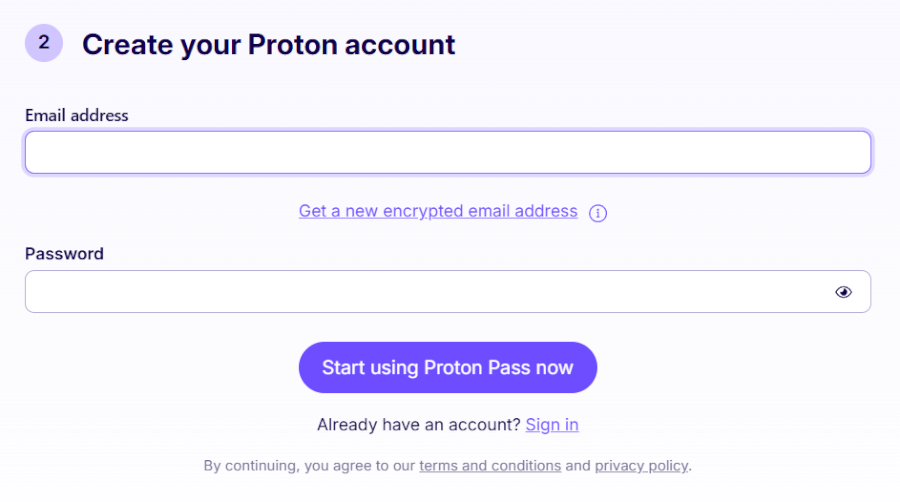
Setting up Proton Pass is refreshingly straightforward. If you already use Proton Mail or another Proton service, you can sign in with your existing account. During setup, Proton generates a recovery phrase — and trust us, you’ll want to store this somewhere safe. It’s your lifeline if you ever forget your master password. From there, it’s simply a matter of adding the browser extension (available for Chrome, Firefox, Safari, and other Chromium browsers) or installing the mobile app on iOS or Android.
Credential Capture and Replay Performance
Logging into sites quickly becomes second nature. Proton Pass detects login fields, suggests stored credentials, and with a single click (or tap), you’re logged in. No more hunting for passwords or copy-pasting from notes-it’s fast, seamless, and secure.
Strong Password Generator Tool
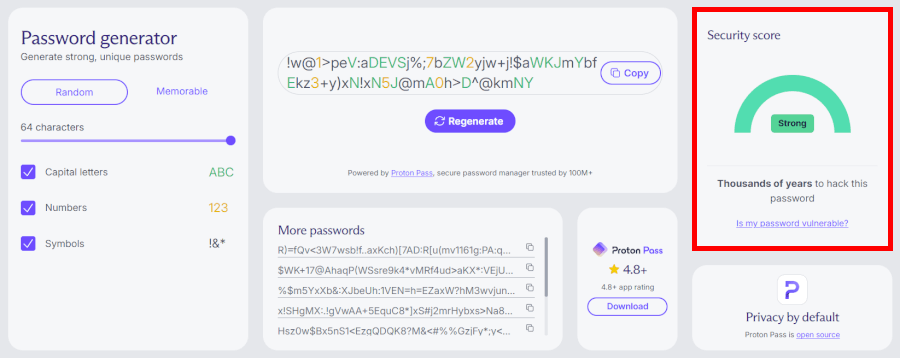
Proton Pass makes generating strong, unique passwords surprisingly easy. You can customize length, symbols, and complexity to match even the pickiest website requirements, so you’re never stuck juggling login rules again.
If you’d rather trade random strings for something more human-friendly, Proton Pass also lets you create passphrases – strings of unrelated words mixed with numbers, like Cosmic2-Pencil7-Giggly9-Tornado1. They’re easier to type and remember while still offering serious protection. Whether you need maximum strength or everyday usability, the generator adapts to your needs.
Password and Vault Sharing
Sharing passwords and other data securely is often challenging, but Proton Pass simplifies this process with its secure sharing feature. Users can create a shared vault and add trusted individuals, such as family members, team members, or business partners.
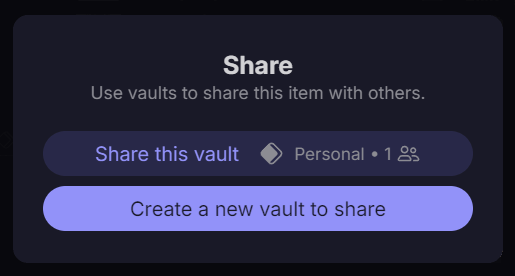
The shared vault is encrypted, ensuring only those with access can view the shared data. You can also share a single item using a secure link. This sharing ability is particularly useful for collaborative environments where multiple people need access to the same accounts. With Proton Pass, you can share your passwords and other data confidently, knowing they’re protected by top-tier security measures.
Passkey Support Implementation
Proton Pass is at the forefront of modern authentication methods with its support for passkeys. Passkeys use public key cryptography to secure user accounts, offering a more secure and convenient alternative to traditional passwords. Proton Pass allows users to create and store passkeys, making it easy to log into accounts without manually entering passwords.
This feature not only enhances security but also streamlines the login process, providing a seamless and secure user experience. With Proton Pass, you can embrace the future of authentication and protect your accounts with cutting-edge technology.
Switching from Another Manager to Proton Pass
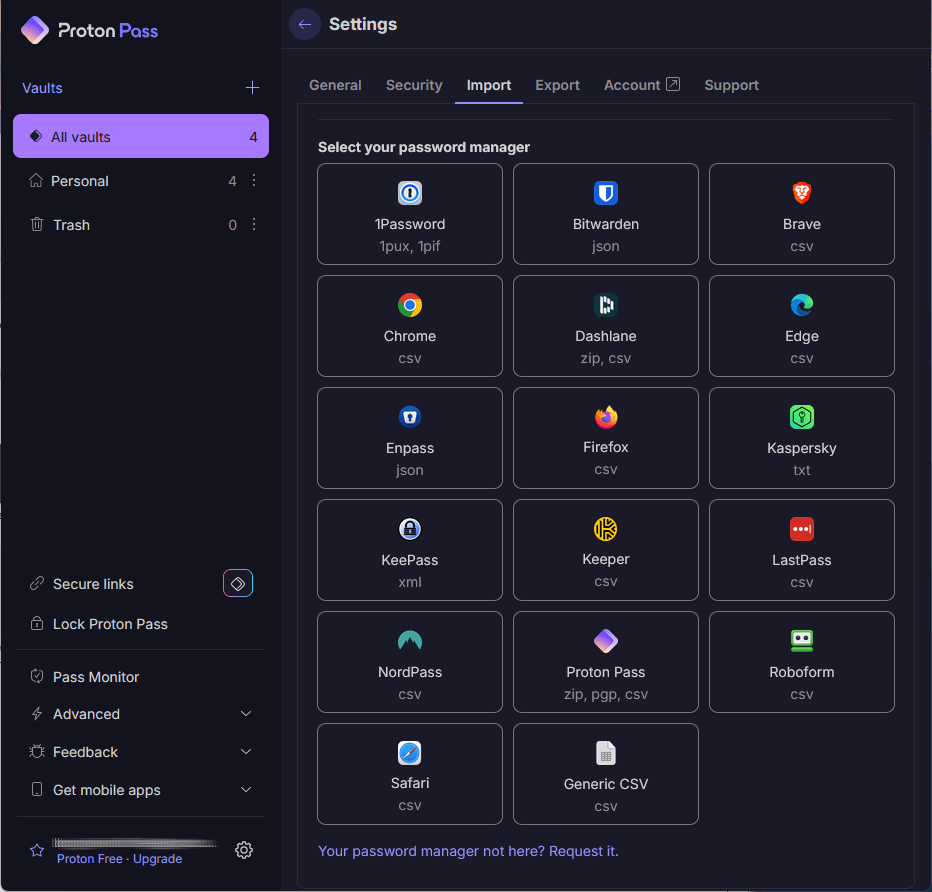
Migrating to a new password manager can be challenging, but Proton makes it manageable. You can import data directly from most major competitors or via CSV export. Once everything’s inside Proton Pass, it’s easy to organize items into vaults, add credit cards or secure notes, and let autofill handle the rest.
Thankfully, Proton Pass is configured to import your data from most competing password managers, as you can see here:
Plans and Pricing: How Much Does Proton Pass Cost?
Proton Pass offers four personal pricing tiers catering to different needs: Proton Free, Pass Plus, Pass Family, and Proton Unlimited. Each plan provides varying levels of features and benefits, allowing you to choose the option that best fits your security requirements and budget.
| Proton Pass plans | Proton Free | Pass Plus | Pass Family | Proton Unlimited |
|---|---|---|---|---|
| 1-month | $0/month | $4.99/month | $6.99/month | $12.99/month |
| 1-year | $0/month | $1.99/month | $4.99/month | $6.49/month |
Deal: Get 60% OFF on Proton Pass’ yearly plans >
The free plan is quite generous: Unlimited logins and device sync, password generation, basic vaults, plus a limited number of email aliases. Perfect if you just want solid password protection without extra features.
Meanwhile, paid plans unlock features including unlimited “hide-my-email” aliases, built-in 2FA authenticator support, more flexible vault and sharing options, dark web monitoring, and Proton Sentinel for enhanced account protection.
You receive a 30-day money-back guarantee on premium plans. If you’re not satisfied, you can cancel within 30 days for a full refund.
Payment options include major credit/debit cards and PayPal. In many regions, you can also use Bitcoin or Proton credits/gift cards, where supported.
All versions of Proton Pass give you access to free versions of other apps in the Proton ecosystem. In other words, when you open any Proton Pass account, you gain access to free versions of Proton VPN, Proton Mail, Proton Calendar, and Proton Drive.
Now, let’s examine deeper what each Proton Pass plan actually includes and how they compare in everyday use.
Proton Free: Superb Security Features, Zero Cost
If you’re exploring password managers, Proton Pass Free provides substantial value without asking for a dime. It covers essentials like unlimited logins, notes, and syncing across every device you own: Windows, macOS, Linux, iOS, Android, and all major browsers.
One standout feature is Hide-my-email aliases: Disposable email addresses keeping your real one hidden. You receive 10 of these on the free plan, perfect for newsletters, online shopping, or any site you don’t fully trust.
You also get two customizable vaults (each with its own encryption key), so you can neatly separate personal and work logins. Sharing vaults is easy, and everything is secured with end-to-end AES-256 encryption performed directly on your device.
Additionally:
- Password health alerts notifying you of any weak passwords, as well as if any passwords are being reused.
- Passkey support across all devices.
- Password generator built in.
In short, Proton Pass Free delivers far more than just “basic” protection — it’s a free forever plan that actually feels premium.
Paid Tiers: From Solo Security to Family Protection
While the free plan is impressive, paid tiers are where Proton Pass truly spreads its wings.
Pass Plus unlocks advanced security and flexibility, including:
- Unlimited Hide-my-email aliases
- Dark Web monitoring for leaked credentials
- Integrated 2FA support
- Sharing of individual items or entire vaults (up to 10 people)
- 50 customizable vaults
- Proton Sentinel, an AI-powered shield that can stop even hackers who already know your password
Pass Family is essentially Pass Plus for up to six users, giving each member their own full-featured account – perfect for households wanting top-tier protection without juggling separate subscriptions.
Finally, Proton Unlimited bundles Pass Plus with Proton’s entire privacy suite: Mail, VPN, Drive, and Calendar. It’s the “all-in” option for anyone wanting one subscription to handle everything from passwords to private browsing and secure cloud storage.
Ease of Use: How User-Friendly is Proton Pass?
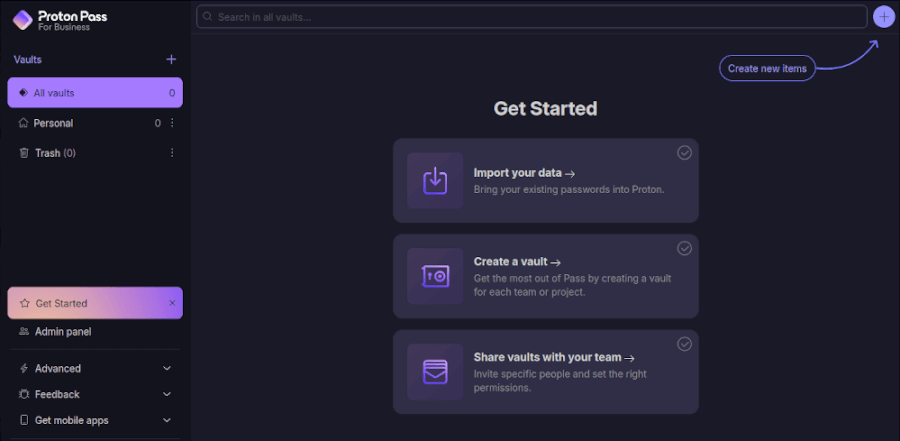
One of Proton Pass’s biggest strengths is its simplicity. The interface is clean, uncluttered, and designed so you can find what you need without navigating through endless menus. Whether you’re logging in from your browser or using the mobile app, the experience feels smooth and intuitive. Autofill kicks in reliably across major browsers and apps, saving you from the hassle of typing complex logins.
The mobile apps deserve special praise – they’re fast, responsive, and make managing vaults on the go surprisingly painless. Organizing your passwords is equally straightforward, thanks to customizable folders and vaults. Need something specific? The lightning-quick search tool finds it instantly, even if you’re juggling hundreds of saved credentials.
All in all, Proton Pass nails usability. It’s powerful enough for security enthusiasts but approachable for anyone who just wants their logins to “just work.”
Compatibility and Integrations
Proton Pass is compatible with a wide range of platforms, ensuring users can access their data on Linux, Windows, Mac, iPhone, and Android devices. The service supports automatic synchronization of logins across all devices, providing seamless access to your data wherever you are.

Browser extensions for all major web browsers enhance Proton Pass usability, allowing for easy integration into different online environments. Additionally, Proton Pass integrates well with other Proton services, making it a valuable addition to the Proton ecosystem for existing users.
Privacy Practices and Data Protection
Privacy is where Proton Pass truly shines. Built in Switzerland – one of the world’s strongest privacy havens – it benefits from strict Swiss data protection laws making it harder for outside entities to access your information. Additionally, Proton Pass uses end-to-end and zero-access encryption, meaning your data is encrypted on your device before it ever reaches Proton’s servers. Even Proton itself cannot read, decrypt, or share what’s in your vaults.
What distinguishes Proton from many competitors is that it doesn’t just secure passwords. Metadata (like usernames, website addresses, and entry titles) is encrypted too, making it virtually impossible for anyone to piece together where you maintain accounts. Add to this the fact that Proton’s apps are fully open-source and regularly audited by independent security experts, and you have a service built with transparency at its core.
User data is stored on secure servers in Switzerland, Germany, and Norway, far from surveillance-heavy jurisdictions. Proton also limits what it collects to the bare minimum (basic account information and some anonymous analytics), while encrypted backups ensure even stored copies of your data remain unreadable. While payment processing relies on trusted third parties like Stripe or PayPal, Proton itself maintains no record of your full card details.
All in all, Proton Pass offers one of the most privacy-friendly setups you’ll find in a password manager. For anyone valuing security and discretion above all else, it’s an easy choice.
Customer Support: Finding Help with Proton Pass
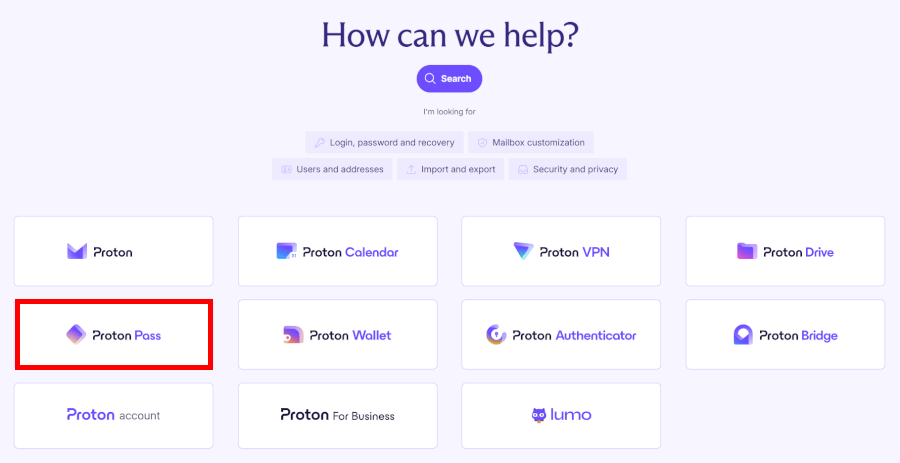
Proton Pass doesn’t include live chat or an AI assistant, but it does offer a well-stocked Support Center, comprehensive FAQs, and a responsive ticket system. The Support Center is the real asset here, packed with step-by-step guides and troubleshooting tips for everything from setting up passkeys to managing vaults and email aliases. A built-in search bar makes finding the right article quick and painless.
When that’s insufficient, you can reach the team through Proton’s online contact form or by email. The form is usually faster since it prioritizes requests, while direct emails may take longer to process. Business and premium customers sometimes receive extras like live chat or scheduled calls, but for most Proton Pass users, the focus is on documentation and email support.
It may not be instant, but the guides are clear, practical, and often enough to solve problems without waiting on a reply.
Recent Updates and What’s Coming Next
Proton Pass isn’t standing still – it’s been rolling out steady updates making it more than “just another password manager.” One of the biggest recent launches is Pass Family, which bundles all the perks of Pass Plus and extends them to up to six users. It’s a simple way to secure the whole household’s digital life under one subscription, without juggling separate accounts.
Another standout addition is Identities. Instead of typing out your phone number, birthday, or passport details repeatedly, you can now store them securely and autofill when needed. It’s a small change saving considerable time, especially for online forms and applications.
Proton has also expanded what you can actually keep inside Proton Pass. Beyond passwords, you can now store 14 new data types, ranging from WiFi credentials and driver’s licenses to medical records and even encrypted file attachments. Add in customizable entries, and Proton Pass is steadily shaping into a secure all-in-one vault for your most sensitive information.
Proton Pass Alternatives: The Top Password Manager Contenders
Proton Pass is a great option, but it’s not the only player in the game. Here’s how NordPass, 1Password, and Dashlane compare.
From the makers of NordVPN, NordPass shines with its modern XChaCha20 encryption and affordable pricing. You receive tools like a password generator, health reports, and a breach scanner — all wrapped in a zero-knowledge design. The catch? The free plan only works on one device, and it lacks some of 1Password’s advanced extras. Still, if you want strong protection without breaking the bank, NordPass is tough to beat.
Polished, feature-rich, and security-obsessed, 1Password is a favorite for good reason. Its Secret Key + master password combo adds serious protection, while extras like Watchtower and Travel Mode make it stand out. The downside? No free tier and steeper prices than rivals. If you’re willing to pay more for the smoothest experience, though, 1Password delivers.
If you want more than just a password manager, Dashlane is your pick. Its premium plan comes with a built-in VPN, plus dark web monitoring, passwordless login, and a family plan covering up to 10 users. Downsides include a pricey subscription and a limited free version (25 passwords, one device). But for an all-in-one security suite, Dashlane packs considerable punch.
For a deeper dive, check out our full reviews of NordPass, 1Password, and Dashlane.
The Final Word on Proton Pass: Is It Right for You?
Proton Pass isn’t just another password manager — it’s a privacy powerhouse wrapped in a sleek, easy-to-use package. With end-to-end encryption, zero-knowledge architecture, and seamless integration with Proton Mail, Proton VPN, and Proton Drive, it keeps your passwords and sensitive data locked down while making your digital life simpler. Being open-source and protected by Swiss privacy laws adds an extra layer of trust, giving you confidence that your data stays truly private.
Whether you stick with the free tier or dive into a paid plan, Proton Pass delivers serious value. From secure vault sharing and customizable password generation to passkey support and Hide-my-Email aliases, it’s packed with features making managing your passwords almost enjoyable. And if you’re already part of the Proton ecosystem, everything just works together smoothly.
Proton Pass is more than a password manager — it’s a digital security hub protecting your identity, streamlining your online life, and growing with your needs.